
About #
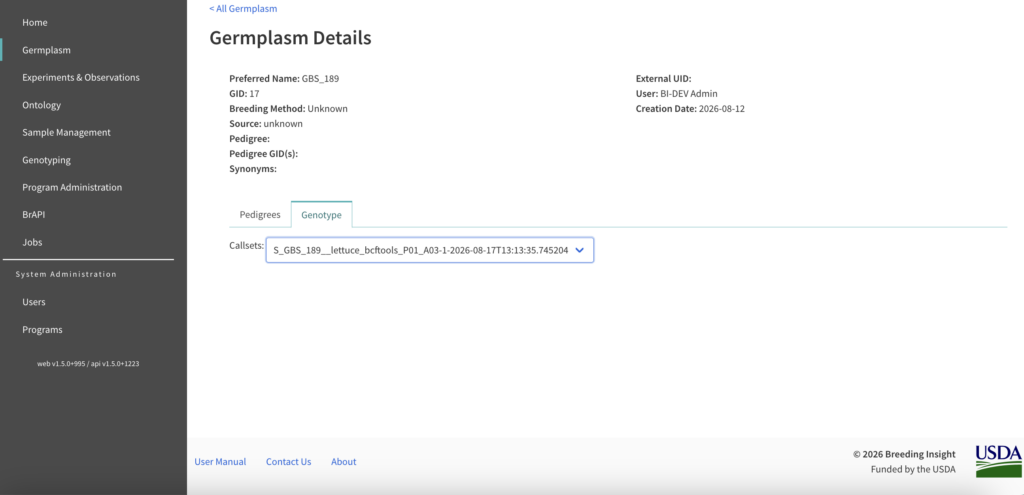
Callsets identified by genotyping can be seen in DeltaBreed’s germplasm view. This feature is designed to display marker data coming from Breeding Insight’s QC and validation pipeline. Contact your BI coordinator for more information about loading your genotypic data. Expect expansion of genotyping features in future versions of DeltaBreed.
Germplasm View #
 Select a genotyped germplasm record and navigate to the details to review the SNP calls. By default the most recently uploaded callset is selected. Previous callsets are available from the dropdown menu. Select views from the different chromosomes, or scaffolds, detailed in the .vcf file.
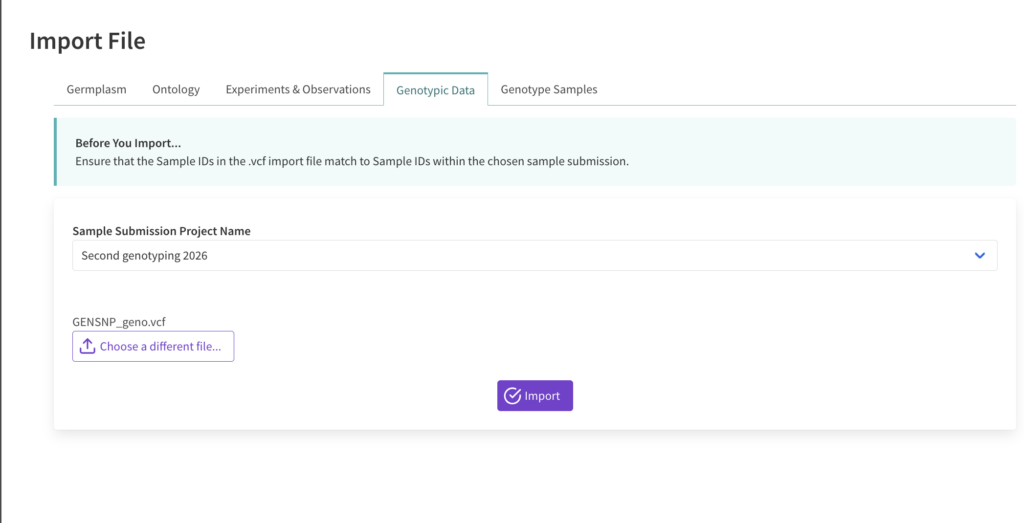
Create Genotyping Experiment & Import Genotypic Data #
Genotypes can be connected via GID (germplasm identifier) or ObsUnitID (experiment identifier).
Create a sample submission using the sample submission template. Fill out either the GID or ObsUnitID column using the unique identifiers for either the germplasm (GID) or the experiment (ObsUnitID).
Upload the sample submission template.
Upload a VCF file under “Genotypic Data”. Make sure the sample names in the VCF match the sample names in the sample submission associated with the genotypic upload.